

Specifying a panel size looks like a minor line item until someone has already cut the cabinet door. The spec sheet says 15 inches, the operator stands three meters away, and the customer expects a gloved hand to hit a soft button the size of a thumbnail.
This panel PC screen sizes guide walks through the eight size bands you will actually be quoted, from 7 inch HMI terminals to 21.5 inch SCADA displays, and the numbers that decide which one belongs on your cabinet.
What “Screen Size” Means on an Industrial Panel PC
On an industrial panel PC, screen size is the diagonal of the active display area, not the outer dimensions of the enclosure, which is why the cutout must always come from the supplier’s panel drawing rather than from the nominal size.
The measurement covers the lit area only, excluding the bezel and the chassis around it. Three panels all sold as 15 inch can show different active display areas when their bezel widths differ.
The cutout is a separate number, set by the front frame and the sealing structure behind it. Two suppliers selling a 15 inch industrial panel PC will often publish different cutouts and hole positions, and neither is wrong.
Touch active area usually matches the display area or runs slightly larger. When the touch layer stops short of the graphic, controls at the edge of the screen become unreliable, and no software change fixes that.
The Common Industrial Panel PC Screen Sizes, 7″ to 21.5″
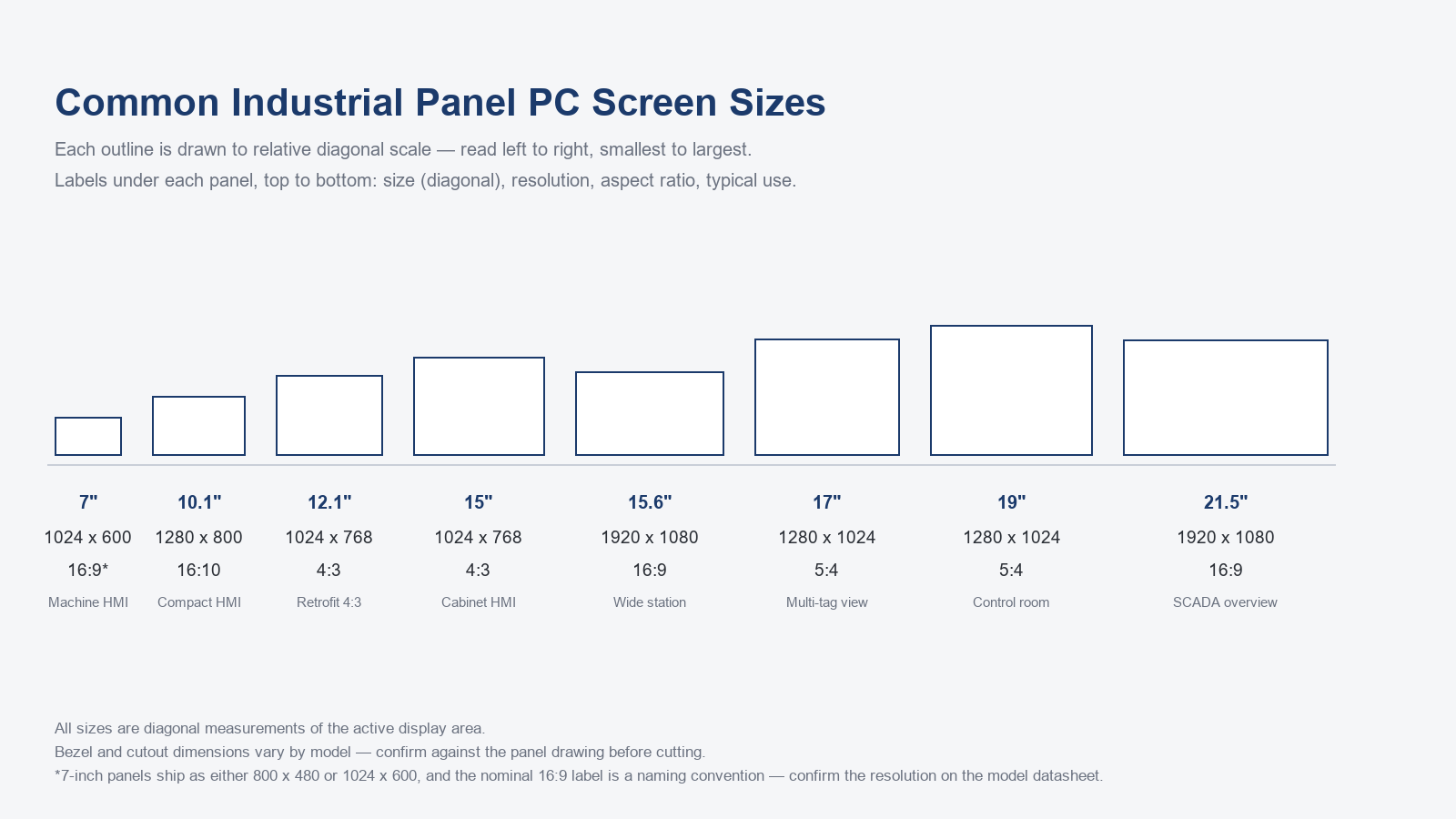
The screen sizes you will actually be quoted in an industrial project cluster into eight diagonal bands: 7, 10.1, 12.1, 15, 15.6, 17, 19 and 21.5 inches.
Two hardware generations sit side by side here. The legacy screens split into two shapes: 12.1 and 15 inches at 4:3, and 17 and 19 inches at 5:4, which between them match most existing plant HMI libraries. The newer generation covers 10.1 inches at 16:10 and 15.6 and 21.5 inches at 16:9. The 7 inch band is the outlier, built for arm’s-length machine terminals, and the one band where you should check the datasheet, since 1024 x 600 and 800 x 480 both ship in that class. The 16:9 label on this band is nominal: 1024 x 600 is closer to 128:75, so confirm both the resolution and the aspect ratio on the datasheet.
The two extremes of the range serve opposite jobs. A 7 inch panel exists so one operator can reach it; a 21.5 inch panel exists so a control room can hold trends and alarm lists from three or four meters back. Pick the end that matches the station, then check the resolution you need, because size on its own does not decide how much data fits.
The same eight bands, in the form you can paste into a submittal:
| Size (diagonal) | Typical native resolution | Aspect | Nominal lit area (mm) | Typical station |
|---|---|---|---|---|
| 7″ | 1024 x 600 | 16:9* | 155 x 87 | Machine HMI |
| 10.1″ | 1280 x 800 | 16:10 | 218 x 136 | Compact HMI |
| 12.1″ | 1024 x 768 | 4:3 | 246 x 184 | Retrofit 4:3 |
| 15″ | 1024 x 768 | 4:3 | 305 x 229 | Cabinet HMI |
| 15.6″ | 1920 x 1080 | 16:9 | 345 x 194 | Wide station |
| 17″ | 1280 x 1024 | 5:4 | 337 x 270 | Multi-tag view |
| 19″ | 1280 x 1024 | 5:4 | 377 x 301 | Control room |
| 21.5″ | 1920 x 1080 | 16:9 | 476 x 268 | SCADA overview |
Lit area is calculated from the nominal diagonal and the stated aspect ratio; bezel and cutout come from the panel drawing.
*7-inch panels ship as either 800 x 480 or 1024 x 600, and the nominal 16:9 label is a naming convention — confirm the resolution on the model datasheet.
Lunox has built industrial panel PCs in its own factory for 15 years, which is why the same eight size bands are available across 7, 10.1, 12.1, 15, 15.6, 17, 19 and 21.5 inch enclosures.
Choosing a Size by Viewing Distance and Touch Target
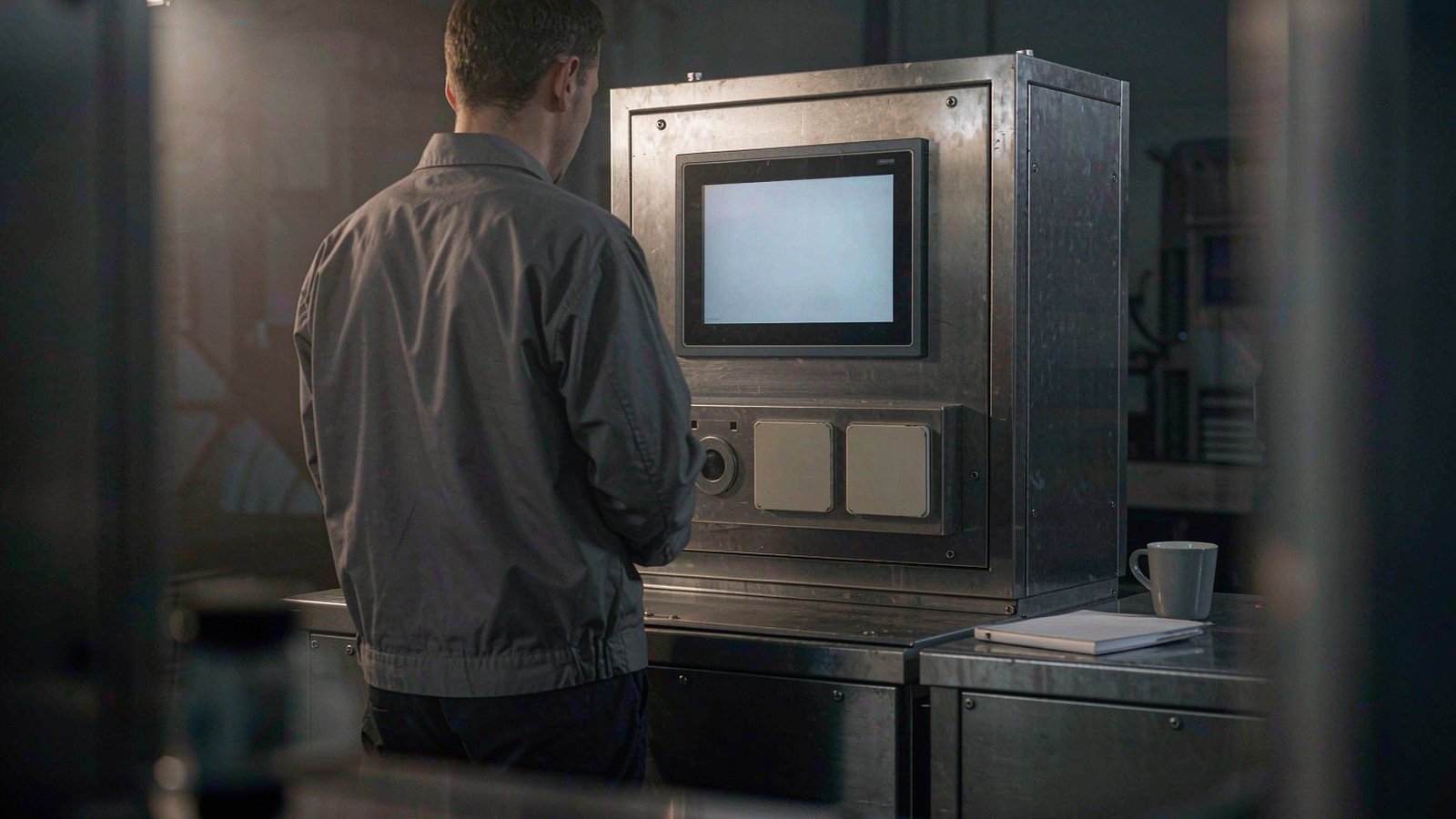
Match screen size to viewing distance first, because comfortable reading requires a character to subtend roughly 15 to 20 arcminutes of visual angle, which sets a hard minimum for how far an operator can stand from a given panel.
One arcminute is about one sixtieth of a degree, close to the resolution limit of a healthy eye. The 15 to 20 arcminute range is what human factors work typically uses for comfortable reading, not the absolute threshold, so treat it as a planning number rather than a standard you can certify against. ISO 9241-303, the display ergonomics standard, works in the same range.
The sequence runs backward from the operator’s position. Viewing distance plus the arcminute target gives a minimum character height; character height plus the density of your HMI screen gives a minimum diagonal. Choosing a size first is how stations get rebuilt twice.
Touch adds a second constraint. A finger-driven target is usually around 9 to 12 mm on a side to be hit reliably without looking, which is an industrial rule of thumb rather than a written standard. Gloves, oil and wet hands push the target larger and the spacing wider. Distance sets the lower bound on size, and the operator’s hands push the practical limit up.
Resolution and Aspect Ratio: 4:3, 16:9 and 5:4 in Practice
A larger diagonal does not automatically give you more information, because resolution is independent of screen size, so a 15 inch panel and a 15.6 inch panel can show very different amounts of data even though they occupy almost the same space on a cabinet.
The 15 inch 4:3 version carries roughly 305 x 229 mm of lit area; the 15.6 inch 16:9 version carries roughly 345 x 194 mm. Same nominal diagonal, a different shape, and therefore a different hole in the door.
In practice the pairings run like this. The legacy bands pair 12.1 and 15 inch 4:3 with 1024 x 768, and 17 and 19 inch 5:4 with 1280 x 1024. The newer bands pair 10.1 inch 16:10 with 1280 x 800, and 15.6 and 21.5 inch 16:9 with 1920 x 1080. The 7 inch class usually carries 1024 x 600, subject to the model datasheet. Read these as common configurations, not fixed rules.
Aspect ratio changes layout, not pixel count, and at the same diagonal a 4:3 or 5:4 panel actually gives you roughly 12% more area than a 16:9 one. What matters day to day is shape. A 4:3 or 5:4 image is closer to square, so rows of tags and buttons stack naturally; a 16:9 image is wider and shorter, which suits trend lines but squeezes vertical lists.
The retrofit is what catches people out. An existing HMI project is built on a fixed pixel layout, and moving from 4:3 to 16:9 redistributes it rather than scaling it, so controls must be re-placed and re-tested. Our panel PC vs touch monitor comparison covers the related question of whether a retrofit needs a new computer or only a new display.
Pixel density follows the same logic. A small panel at a high pixel count renders fine detail sharply, but at three meters that detail is too small to read, so a larger panel at moderate PPI usually wins.
Size by Application: Machine HMI, Line Station and SCADA Overview
Start from the job rather than the number, because machine-level HMI work usually lands between 7 and 10.1 inches, line-side operator stations between 12.1 and 15.6 inches, and control-room SCADA overviews between 17 and 21.5 inches. If you treat this panel PC screen sizes guide as a starting point rather than a rule, the bands below map each size to the station it was built for, while viewing distance and cutout still make the final call.
Machine-level HMI is a one-operator job at arm’s length, showing a few controls and readouts. The 7 and 10.1 inch bands cover most of it.
Line-side stations are where 12.1, 15 and 15.6 inches live: the operator stands, watches several parameters at once and may wear gloves. Moving an existing 4:3 project onto a 16:9 screen at a line-side station is the most common place where controls have to be re-placed and re-tested, because the operator is standing at the panel rather than walking past it.
Control-room work pushes past 17 inches, where multi-tabbed SCADA clients and alarm lists read better from three or four meters back. At three meters, the same 20 arcminute target calls for a character about 17 mm tall, which on a 21.5 inch Full HD panel means text drawn roughly 70 pixels high.
Across more than 200 industrial panel PC projects delivered in mainland China, the correlation we keep seeing is that the panel size follows the viewing distance and the amount of data on screen, not the buyer’s first instinct.
These ranges open a conversation, they do not close it. Our industrial panel PC buyer’s guide covers the wider framework around sizing, and if you already have a distance in mind, Request a quote and we will send back the options that fit.
Cutout, Depth and Clearance: What Size Means for Your Cabinet
The size you choose only matters if it fits the cabinet, so always cut from the supplier’s panel drawing, because two 15 inch panel PCs from different makers can require different cutouts and different mounting hole patterns.
The panel drawing is the only document that gives you the dimensions your fabricator cuts to: the cutout, the corner radii, the mounting clip positions and their tolerances. For a 15 inch industrial panel PC those dimensions differ between makers, and the outer case size on a datasheet tells you nothing about them. Ask for the drawing before you commit to an order. A cutout you cannot verify in advance is a cabinet door you may end up replacing. These are lit-area figures, not cutouts — the drawing still decides the opening.
Rear clearance is the dimension people forget. Behind the panel you need room for the chassis depth, the bend radius of the cables leaving the connectors, and whatever access service and airflow require. We do not publish a fixed clearance figure, because it depends on your own enclosure.
Accessory mounting is simpler. VESA interface patterns of 75 x 75 mm and 100 x 100 mm cover most of this class, published by the Video Electronics Standards Association, and they are the reference points if a bracket or arm is already in the plan.
Cutout tolerance and sealing are linked: the opening has to sit inside the gasket’s working range, or water ingress stops being hypothetical. We cover that in our waterproof industrial panel PC selection guide.
Frequently Asked Questions
The sizing questions integrators ask us most are which diagonal fits a given viewing distance, whether 4:3 panels are still available, and how much gloves change the answer.
What size panel PC do I need for a factory floor?
Start from the distance, not from the floor area. Measure the smallest character in your HMI project and the distance the operator actually stands at, then apply the 15 to 20 arcminute range above — that gives you the minimum diagonal the job needs. The bands quoted in the table are shortcuts into the answer, not the answer itself.
Is 15 inch still the standard industrial panel PC size?
It remains the most common single band, largely because the installed base of 4:3 HMI software was built around it. New installations increasingly choose 15.6 inch, since that panel carries 1920 x 1080 in nearly the same footprint. Neither has replaced the other.
Can I still buy a 4:3 industrial panel PC?
Yes. The 12.1, 15, 17 and 19 inch 4:3 and 5:4 panels are still supplied, and they remain the least disruptive replacement for a legacy HMI you do not intend to rewrite. Availability is thinner at the small end.
How far can an operator stand from a 15 inch panel and still read it?
It depends on character height, not on the diagonal alone. With typical HMI text sizes, a 15 inch panel is comfortable at roughly one to two meters, where characters land roughly 6 to 12 mm tall, or about 20 to 40 pixels on a 1024 x 768 panel. Measure the smallest text on the screen and work back from the 15 to 20 arcminute range.
Next Step: Send Us Your Viewing Distance and Cutout
Send us three numbers, viewing distance, mounting cutout and glove type, and we will come back with the panel sizes that actually fit, starting from a single sample unit.
Those three inputs usually narrow the eight bands to one or two candidates. We return the shortlist with the panel drawing and a 3D file so your fabricator can confirm the opening first.
MOQ starts at 1 unit, so you can order a single panel at your target size, test it on the actual cabinet and viewing distance, and only then scale to batch. All units ship with 100% new components sourced from the original manufacturers, not refurbished parts.
Request a quote or Message us on WhatsApp with your drawing, and we will size it against the list.