

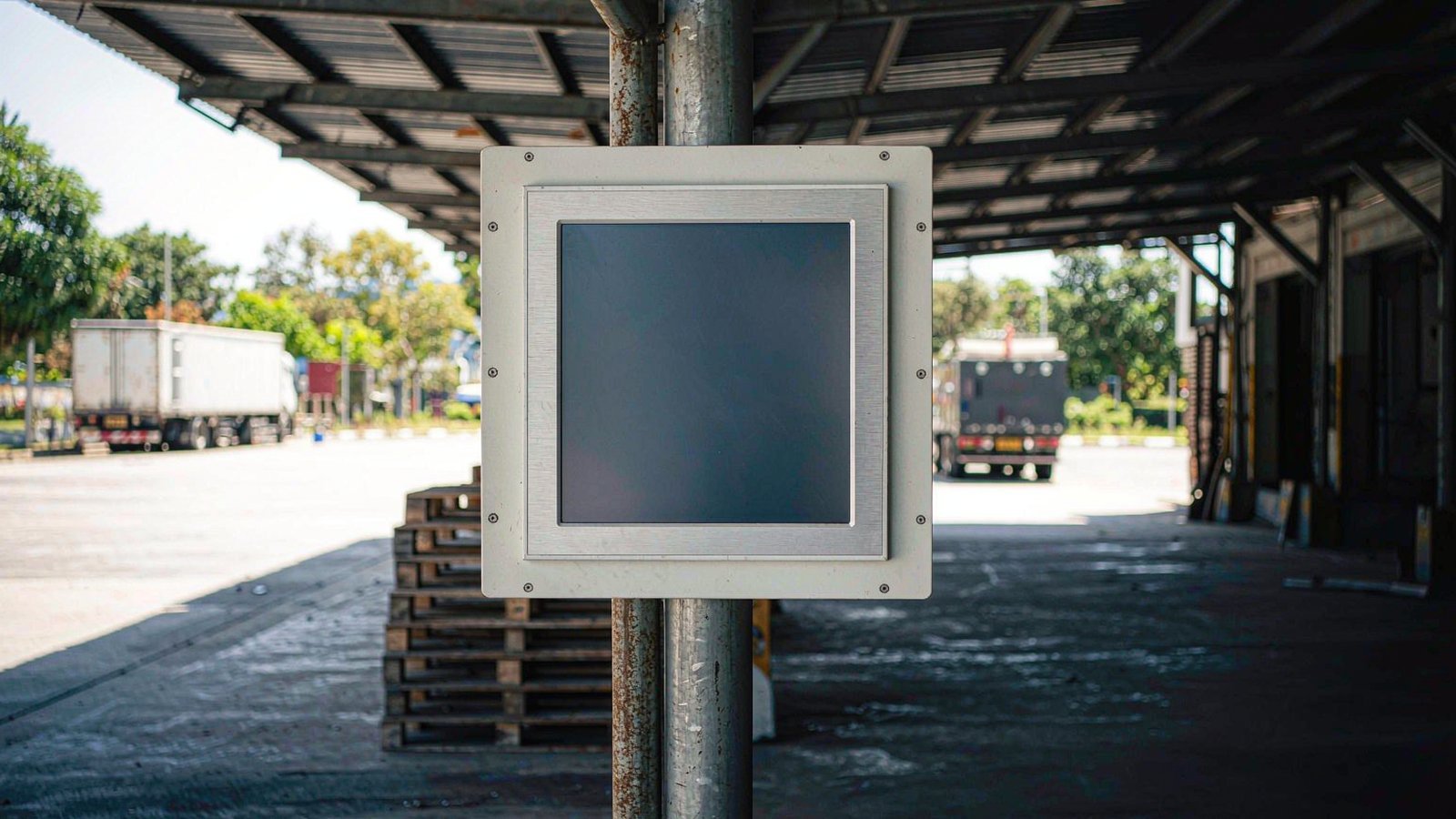
A screen that reads perfectly in the meeting room can be unreadable on the dock where it is actually installed. The quotation promised 1000 nits, the noon sun disagreed, and the acceptance test turned into an argument about whose specification was wrong.
A sunlight readable panel PC is not simply a brighter screen: it is a set of decisions — brightness, optical bonding, surface treatment and shading — that together decide whether the HMI on a loading dock in Manila is readable at noon.
What “Sunlight Readable” Actually Means
A sunlight readable panel PC is defined by contrast, not by brightness alone: it is a display whose backlight outshines the ambient light reflected off its own glass, which is why reflectance, bonding and surface treatment matter as much as the nits figure.
In numbers: ambient illuminance in lux, multiplied by surface reflectance and divided by π, gives the glare luminance in cd/m² riding on top of the image. Standards such as ISO 9241-303 frame display image quality as performance requirements for effective viewing, but they do not hand you a site-specific number; the derivation starts from your own lux reading.
That is why 1000 nits became the industry shorthand and why the number is meaningless alone: it says nothing about reflectance. Bare cover glass typically reflects around 4% of incident light, so under direct midday sun the reflected component alone can exceed 1000 cd/m² and bury a backlight that looks generous indoors.
Three levers decide the outcome: backlight brightness to outshine the reflection, surface treatment to reduce the reflection, and optical bonding to pull the black level down; money belongs on the weakest lever. Transflective panels, which reuse ambient light instead of fighting it, do read in sunlight but look dim indoors and rarely win a commercial comparison.
How Much Brightness Your Site Actually Needs
You size screen brightness from the ambient light at the exact mounting position: estimate the illuminance in lux, multiply by the glass reflectance and divide by π to get the glare the screen must outshine, then target roughly three times that figure.
A worked example shows why so many canopy stations are over-specified. A canopy position sits around 10,000 lux on a bright day, and bare glass at a typical 4% reflectance returns roughly 10,000 × 0.04 ÷ π, about 127 cd/m² of glare. Three times that is the equation’s answer; a real station catches more than the equation sees. A covered loading dock in Singapore lands in the 1,000–1,500 cd/m² band of the table below: the canopy strips the direct beam, but the concrete floor still bounces a lot of light back up at the screen. Against 100,000 lux of direct sun the same equation demands several thousand nits, which no reasonable budget reaches; the winning move is then to cut reflectance through bonding, coating and shading. The three-to-one target itself is a common engineering rule of thumb for field readability, not a value any standard mandates.
Every figure in the table is a typical range that moves with weather, season, hour and stack-up; treat each row as an input to the calculation, not a guaranteed value.
| Deployment environment | Typical ambient light | Suggested brightness | Suggested treatment |
|---|---|---|---|
| Indoor control room / office | 300–500 lux | 300–500 cd/m² | Standard glass, no bonding needed |
| Factory floor under roof | 500–1,000 lux | 500–800 cd/m² | AG coating optional |
| Canopy / veranda station (semi-outdoor) | 1,000–10,000 lux | 800–1,000 cd/m² | Optical bonding + AG |
| Window-adjacent dock / counter | up to 10,000 lux in glare hours | 1,000–1,500 cd/m² | Optical bonding + AR |
| Open-air, overcast or shaded outdoor | 10,000–20,000 lux | 1,000–1,500 cd/m² | Optical bonding + AR, plus shading where possible |
| Direct sunlight on the glass | 50,000–100,000+ lux | 1,500–2,500+ cd/m² | Optical bonding + AR and passive shading; brightness alone cannot win |
Optical Bonding: What the Air Gap Costs You
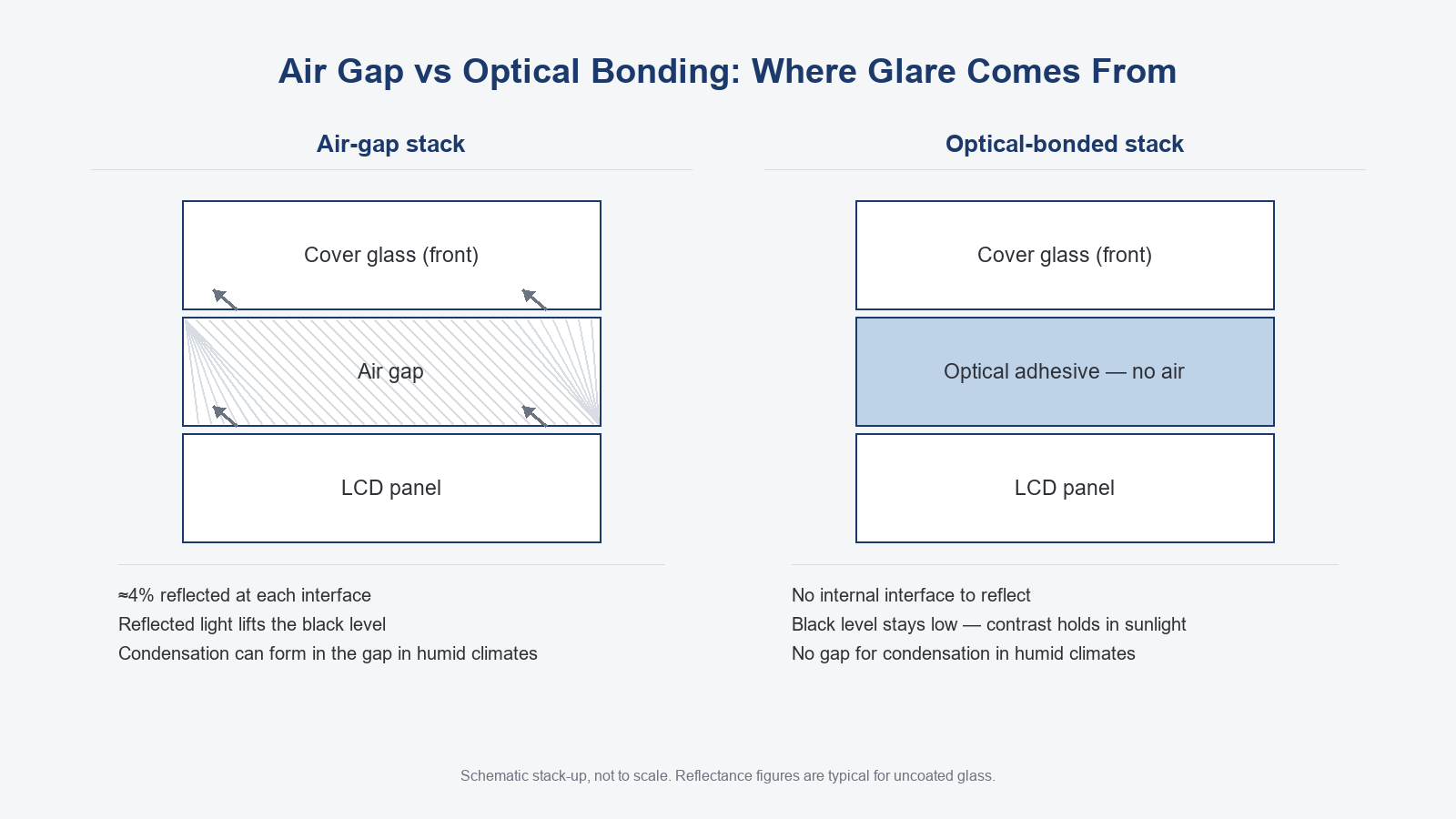
Optical bonding fills the air gap between the LCD and the cover glass with a clear adhesive, removing the internal reflection surfaces that lift the black level, wash out contrast in sunlight and collect condensation in humid climates.
In an unbonded display the LCD and cover glass are separated by an air gap, and light reflects by roughly 4% at every glass-to-air boundary, typical for uncoated glass. Ambient light bounces off the outer surface and again off the inner one, and the backlight bounces at the same boundaries; all of it lands on the image and lifts the black level. A panel with deep blacks indoors shows washed grey outdoors, and lost contrast, not lost peak brightness, is what makes it unreadable.
The gains rank like this. First, sunlight contrast: the black level drops and the same backlight reads dramatically better in the sun. Second, and the one almost nobody warns humid-climate buyers about, there is no gap left for moisture to condense in; a screen moving between an air-conditioned room and a sticky veranda can fog behind the glass where no cleaning ever reaches, a quiet and unrepairable failure mode in Southeast Asia. Third, the bonded laminate is stiffer against impact and cover-glass flex. Fourth, the touch sensor sits closer to the image.
The costs are real: bonding raises unit cost, cannot be reworked in the field, and a damaged bonded assembly is replaced as a complete module at a higher per-unit repair price. The adhesive conducts heat somewhat better than the air it replaces, so the thermal path is not the argument against it.
When the budget is finite, bonding ranks above peak brightness: a 500-nit fully bonded unit usually beats a 1000-nit air-gap one at a semi-outdoor position, because the second loses at the black level, not the maximum.
AR and AG Coatings: Choosing the Reflection You Live With
Anti-reflective (AR) coating cuts the roughly 4% reflection off bare cover glass to below 1–2%, depending on the coating stack, while anti-glare (AG) treatment scatters that reflection into a diffuse haze: AR buys contrast and sharp text, AG buys comfort and smudge tolerance, and strong direct sun usually needs AR. Neither coating changes the brightness the backlight delivers; the measurement on the datasheet stays the same after either treatment.
AR genuinely weakens the specular reflection, so text stays sharp and colors hold; the price is higher cost, more visible fingerprints, and a residual hot spot when a low sun reflects into the viewer’s eye. AG is cheaper, hides smudges and suits operators close to the screen, but the haze costs edge sharpness, dense small HMI text can look soft, and the diffused light still lifts the black level somewhat.
Do not specify an AG-plus-AR pair by default. Ask what light dominates the position: under diffuse skylight AG alone is usually enough; against direct sun AR is the one that works, because scattering spreads the sun’s specular image without removing it.
The structure of the touch layer and cover glass also changes transmittance and reflection; that comparison belongs to our capacitive-versus-resistive article.
Brightness Costs Power, Heat and Lifetime
Every extra hundred nits is paid for in power and heat: a high-brightness backlight draws more current, runs hotter and ages faster, so the right brightness is the lowest one your site actually needs — which is exactly why bonding and coating, which lower the brightness you need, outlast any peak-nits upgrade.
High-brightness models (the 1000-nit-and-above class) drive the backlight separately from the compute board, and consumption climbs close to linearly with the brightness setting. Because bonding and AR lower the brightness needed for the same readable contrast, they lower running power too, which is the second argument for spending there instead of on peak nits.
LED and driver waste heat concentrates behind the display head, so high-brightness units are more sensitive to junction temperature and cooling design, especially on fanless enclosures. Brightness and thermal margin compete for the same budget.
LED backlights fade with age and heat accelerates the fade. Vendors quote half-brightness hours, but definitions differ, so ask for the measured brightness-decay curve instead of comparing headline numbers; measurement conventions are maintained by the Video Electronics Standards Association. Backlight aging is one reason every unit is built with 100% new, original components: refurbished panels and reclaimed LED batches are the most common source of screens whose brightness collapses in the first year of outdoor service.
The engineering conclusion: brightness is rented, bonding is bought. Peak nits decay while the reflectance removed by bonding, coating and shading stays removed. PWM dimming earns a footnote: stepping brightness down by schedule saves power and slows aging when the sun is not the problem.
HMI Color and Contrast Under Direct Sun
Under direct sun, ambient light adds a white veil over the image, washing out both contrast and perceived color: dark HMI themes with high-saturation foreground elements stay readable where mid-grey and pastel palettes disappear, so part of the fix is in the palette, not the hardware.
Strong AG haze erodes the edges of small characters on top of that veil, and the result is familiar to anyone who has commissioned outdoors: a palette tuned in the office reads differently on the same machine at the site, one of the most common acceptance disputes.
Three software-side changes cost nothing. Prefer dark backgrounds with high-saturation foregrounds, because dark themes lean on the black level that bonding protects, and mid-grey or pastel fields vanish first. Do not key critical alarms on color alone; red and yellow lose discrimination in strong light, so add shape or position redundancy. And re-derive font sizes for outdoor contrast rather than inheriting them from an indoor project.
This is the free half of the fix: it makes sure the hardware you paid for is visible.
Grade the Deployment: Open Air, Canopy, Dock and Window
Grade the deployment before you spend money on brightness: an open-air unit in direct sun needs bonding, AR coating and physical shading together, a canopy station rarely needs more than 1000 cd/m², and a shaded loading dock that catches sun for two hours a day is configured for those two hours, not for the average. Sizing the screen for the viewing distance is a separate exercise, and our panel PC screen sizes guide walks through it.
Choosing a sunlight readable panel PC gets easier once the site is graded, because each tier sets a different ceiling on what brightness alone can fix — and on where the budget should go instead.
Indoors the brightness number stops being the decision. Any 300–500 cd/m² panel is readable, and the money is better spent on the touch layer or the operating system.
Open-air positions take the sun full on all day: specify bonding, AR and the highest practical brightness, and tell the end customer plainly that midday direct sun has no display-only fix. Price physical shade first: it is the only lever that works on the whole equation.
Canopy and veranda stations, the most common semi-outdoor case in Southeast Asia, work in diffuse skylight. They rarely need more than 1000 cd/m²; the money is better spent on optical bonding, which fixes the black level that actually makes the screen unreadable there.
Loading docks and doorways get direct sun for part of the day, and the angle shifts with the seasons. Configure for the worst hours and, where the layout allows, orient the screen away from the sun’s daily path instead of averaging the exposure.
Behind glass the direct beam is gone, and 1,000–1,500 cd/m² is usually enough — the coating choice matters more here than the brightness number. Curtain-wall glass throws strong secondary reflections during specific hours, and because the room counts as indoors on the drawing, nobody budgets for outdoor-grade optics until the complaint arrives.
Humidity compounds every tier. Damp air fogs the air gap described above, and canopy stations cycle between wet afternoons and hot dry mornings, aging adhesives and coatings faster than any indoor climate. Sealing is its own selection dimension, defined for enclosures under IEC 60529. Our waterproof industrial panel PC selection guide works through that dimension line by line.
The passive measures are cheap: extend the canopy to the sun’s altitude at the worst hour, keep the screen face out of the equatorial exposure, recess the unit into the cabinet to shrink the lit area, and baffle any fixed glare source. How the unit is mounted is a separate comparison this article leaves alone.
Verify With a Lux Meter and a Sample Unit
Numbers set the tier; eyes close the case. Measure the illuminance at the mounting face during the worst season and hour, a phone app for a first pass and a lux meter for acceptance. Convert it to a target brightness with the method above, then order a single sample unit, mount it on the real position and judge readability with the actual HMI at that worst hour. Write the acceptance condition into the purchase order. Request a quote for a sample configured to your lux reading.
Across more than 200 panel PC projects delivered in mainland China, the most common cause of a not-readable-in-sunlight complaint is not a dim panel but a shaded position that catches direct sun for a couple of hours a day, which is why we ask for the site’s worst hour, not its average.
Frequently Asked Questions
Direct answers to the brightness, bonding and coating questions we hear from integrators and buyers specifying screens for bright, humid or outdoor sites.
How many nits do I need for outdoor use?
There is no fixed number; it depends on the reflectance of your front surface and how much sun reaches the glass. A canopy station typically lands at 800 to 1000 cd/m², while open-air direct sun starts around 1500 and only works combined with bonding, AR coating and shading. Estimate the lux at your position and work backward with the method in the brightness section.
Is optical bonding worth the extra cost?
No — for most indoor applications the air gap costs you nothing that matters. For any position with strong light or a humid climate, usually yes: it improves sunlight contrast and removes the gap where condensation forms, two problems solved by one modification. A standard indoor station at office-level illuminance does not need it.
Does anti-glare coating make text blurry?
A strong AG finish adds diffuse haze that softens small, densely packed HMI text; large text and icon-driven screens barely suffer. If the interface depends on small characters, choose AR or a light AG grade.
Can I upgrade a standard panel PC to sunlight readable later?
The brightness grade can be specified higher at order time, but bonding and coatings cannot be added afterwards; both are applied in the factory before assembly. This decision belongs in the selection stage, not in a retrofit.
Send Us Your Site Conditions
Tell us the mounting position, the ambient light at the worst hour of the day and what shading the site allows, and we will come back with the brightness, bonding and coating combination that fits — starting from a single sample unit.
Four inputs are enough: where the unit will sit (open air, canopy, doorway or window-adjacent), the lux reading at the worst hour if you have one, what shading the site allows, and the HMI background theme you plan to run.
Lunox has built industrial panel PCs in its own factory for 15 years, so the brightness, bonding and coating combination we recommend is a stack-up we assemble and test ourselves, not one we resell from a catalogue.
Request a quote with those details, or Message us on WhatsApp if photos of the station are faster.
For the framework around this decision, the industrial panel PC buyer’s guide covers the full selection sequence.