

Mounting is the panel PC decision that reaches furthest into other people’s work. Choose it late and the changes land on your fabricator’s drawing, your electrician’s wire schedule and your service technician’s night shift, usually after the cabinet has already been welded and painted.
The panel PC mounting options you choose decide three things at once: how the front panel seals against dust and water, how big a hole your fabricator has to cut, and whether a failed display is a quick front-of-door swap or a machine teardown.
This article compares the four ways an industrial panel PC gets fixed into a machine, with one question at the centre: who seals the front. Cutouts, cable space, service access, heat and cost all follow from the answer.
The Four Mounting Options and What Each One Requires
Industrial panel PCs ship with four practical mounting options — panel mount, VESA bracket, open frame and DIN rail or yoke, and the right choice is decided by three questions: what surface you are fixing to, who seals the front panel, and how the unit gets serviced.
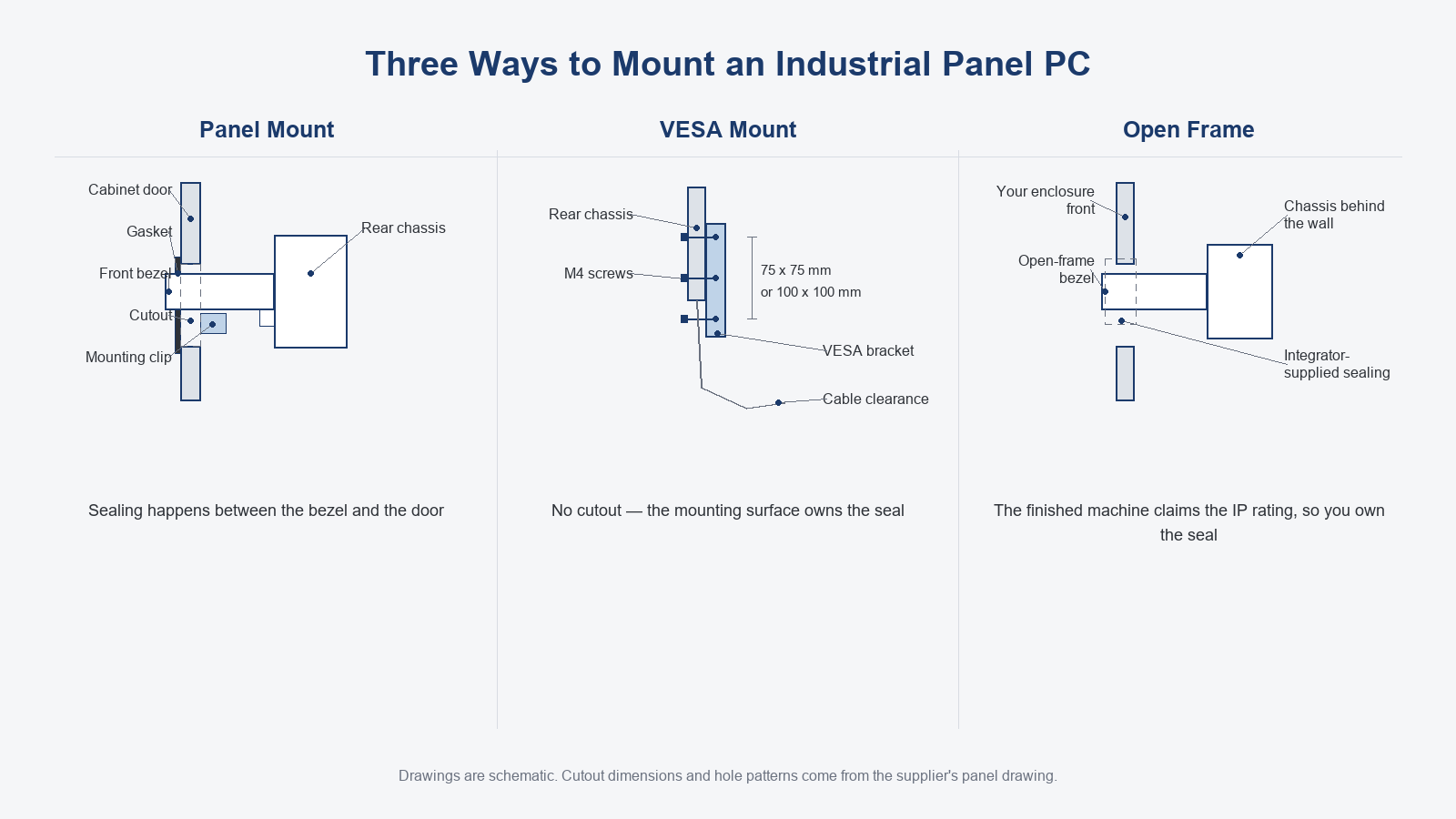
Each option is best defined by what you have to prepare, not by a parameter. Panel mounting asks for a rectangular hole cut to the supplier’s panel drawing and a gasket compressed against it. VESA mounting asks for a bracket or arm with the matching hole pattern on something rigid. Open frame asks for an enclosure of your own, because what you buy is the bare chassis with its front bezel. DIN rail and yoke mounting are the supplementary two: a compact unit clips onto a typical 35 mm rail inside the cabinet, and a yoke bracket clamps the sides of the chassis for a semi-fixed position.
The three main options answer the sealing question in three different ways, and that is the logic this article follows. If the decision in front of you is about the architecture rather than the mounting, start with our what is an industrial panel PC explainer and come back to this table afterwards.
The table below is the three-way decision in one view; each row is unpacked in the sections that follow.
| Requirement | Panel mount | VESA mount | Open frame |
|---|---|---|---|
| Hole you must cut | Yes, from the panel drawing | None | None; your enclosure defines the opening |
| Who seals the front | You, with the supplied gasket | The mounting surface | You, inside your own enclosure |
| Rear clearance needed | Chassis depth plus cable bend | Bracket depth plus arm sweep | Whatever your enclosure allows |
| Swap without tearing down | Out through the front of the door | Unbolt from the bracket | Only as far as your enclosure permits |
| Vibration behaviour | Rigid, clamped on all sides | Depends on the arm or yoke | Depends on your structure |
| Relative cost and lead time | Standard unit; the cutout is your labour | Cheapest, ships off the shelf | Custom development; the batch amortises it |
| Best fit | Cabinet doors and machine fronts | Arms, yokes, walls | Kiosks and purpose-built machines |
Panel Mount: The Default When the Cabinet Door Is Your Surface
Panel mount wins when the cabinet door or machine front is the only surface you have, and it costs you a cutout taken from the supplier’s panel drawing plus a gasket you have to compress correctly — get either one wrong and the front-panel rating you paid for is gone.
The panel drawing is the only source for the cutout, the corner radii, the mounting clip positions and the tolerances around them. Two suppliers selling a 15 inch panel PC can publish completely different cutouts, and the outer case dimensions on a datasheet tell you nothing about the hole, so get the drawing before the door goes to the fabricator.
Gasket compression is where these installations fail first. Under-compressed, the gasket leaves a leak path around the bezel; over-compressed, it takes a permanent set and stops sealing after the first few door cycles. The compression amount and the tightening sequence are specified on the drawing, so compress to that amount and torque the clips in the diagonal order it shows. We do not quote figures here because both values move with the model.
The mounting clips themselves reward a second look. They are meant to clamp the chassis flange behind the bezel, not to bear on the gasket’s compression face, and clip spacing that runs too wide lets the corners of the panel spring back and open the seal exactly where water pools. Door flatness and burrs around the opening eat into the same margin, so a clean, flat opening is part of the sealing specification.
VESA Mount: No Cutout, but the Sealing Moves Somewhere Else
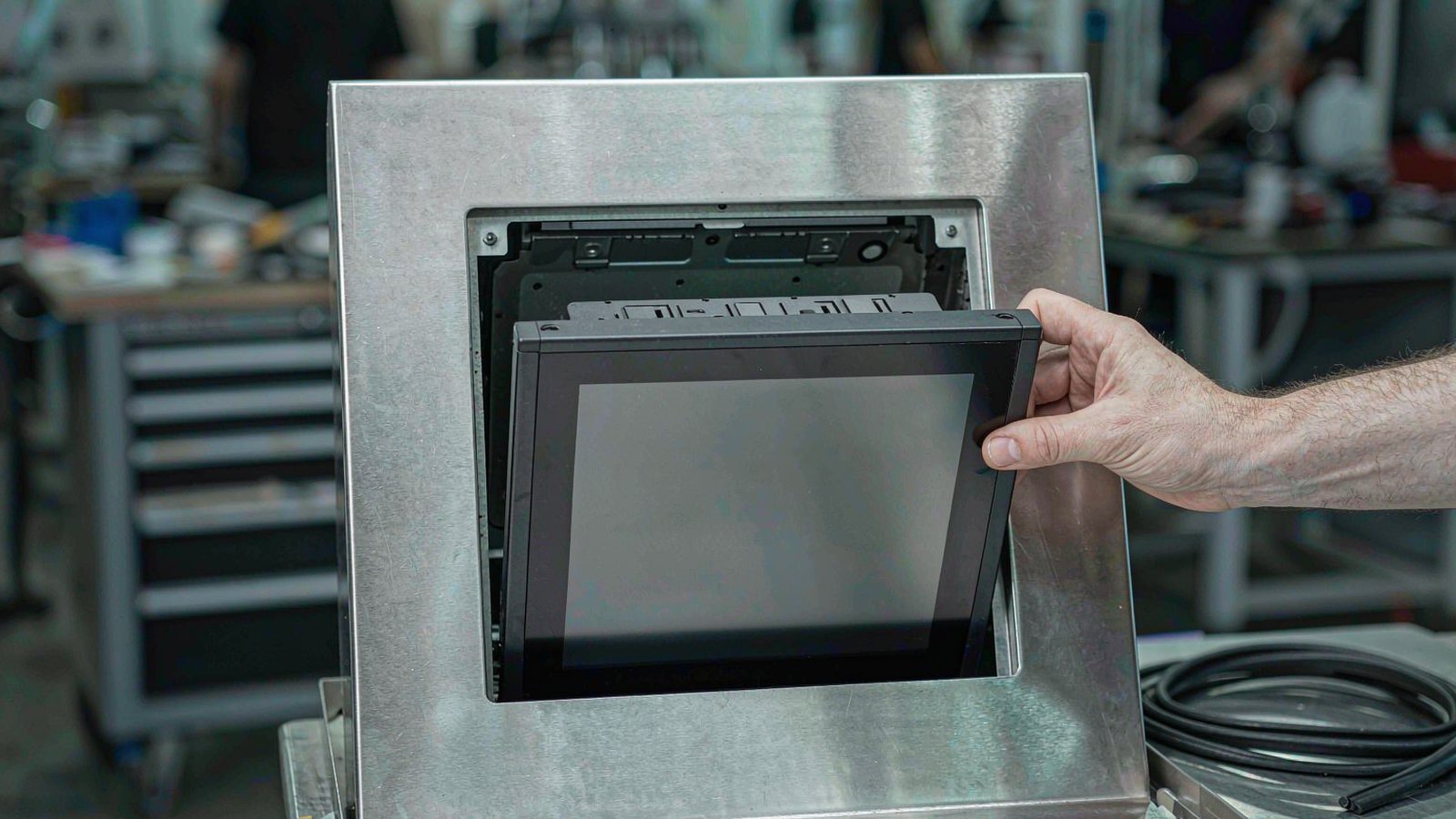
A VESA mount is the right call when the panel lives on an arm, a yoke or a wall you already have, because it needs no cutout at all — but the front bezel then meets no gasket, so sealing becomes the mounting surface’s problem, not the panel PC’s.
The hole patterns come from the VESA FDMI standard published by the Video Electronics Standards Association. The industrial sizes most cabinets use carry MIS-D, which defines 75 x 75 mm and 100 x 100 mm patterns with M4 screws; per the FDMI standard, MIS-D covers the smaller industrial sizes, MIS-E steps up to larger and heavier machines, and MIS-F extends the system to the biggest displays.
Which pattern applies is decided by the back of the chassis, not by the bracket supplier’s stock, so read the unit’s rear hole pattern and weight first and check that the bracket or arm carries the same rating, and buy the bracket second.
The real trade is speed against sealing. Nothing is cut, the unit comes off the bracket in minutes and the position stays adjustable. An arm also adds a lever: on vibrating machines choose a short arm or a yoke and check that its joints lock, because a bracket that swings re-tunes your alignment by itself. A yoke clamps both sides of the chassis, carries load far more rigidly than a single-point arm and is the compromise most semi-fixed stations actually want.
Open Frame: When the Panel PC Is a Component, Not a Product
Open frame is the correct option when the panel PC is a component inside your own machine or kiosk, because you keep the bezel, the sealing and the mounting surface, and with them the responsibility for the ingress protection the finished product claims.
What arrives is a chassis with a front bezel and no enclosure around it, so the housing, the sealing and the mounting surface are all yours to build. The reward is that the finished machine reads as one product, not a computer bolted onto equipment.
The scenario is familiar to machine builders: a kiosk or a purpose-built medical or industrial machine where the computing unit disappears into the structure. The open-frame bezel is one link in your sealing chain rather than the whole of it.
Your enclosure also rewrites the thermal path. A bare open-frame chassis is designed around free air moving over its surfaces; boxed into your housing, its cooling depends on ducts, fans or conduction paths you provide, so hand the layout to the supplier at design stage and have the thermal path checked. Because the minimum order is a single unit, an open-frame variant can go into your enclosure as a sample before the tooling is cut, which is the cheapest possible moment to discover that the thermal path or the bezel line does not fit.
How the Mounting Style Decides Sealing and the Cutout
Sealing responsibility is the one requirement no mounting table resolves for you: write the mounting style and the ingress requirement into the same line of the tender, because each only holds with the other.
Of the panel PC mounting options covered here, only panel mounting puts a gasket between the bezel and your cabinet — VESA and open-frame installations are sealed, or not sealed, by whatever surface you fix them to. The ingress protection an industrial panel PC claims is a property of that front panel and its gasket structure, measured against IEC 60529, and it only holds for a panel-mounted installation whose gasket still works. The waterproof industrial panel PC selection guide works through the ratings themselves. That single difference is the core of the panel mount vs VESA mount decision: one pays with a cutout to keep the seal, the other pays the seal to skip the cutout.
Cutout and sealing are the same problem seen from two sides. The opening has to sit inside the gasket’s working range, and burrs or flatness error beyond the drawing’s limits turn the ingress figure on paper into water in the cabinet.
One tender mistake surfaces at acceptance, not at order: specifying a VESA-mounted unit in a document that carries an ingress requirement. The rating dies with the mounting style, and the audit finds it.
Cables, Service Access and What Replacement Really Costs
The mounting style decides whether a failed panel PC is a twenty-minute swap or a machine teardown: panel-mounted units come out through the front of the door, VESA units unbolt from the bracket, and an open-frame unit comes out only as far as your own enclosure allows.
Panel-mounted units come out through the front once the mounting clips are released, so the cabinet never opens and the swap happens in front of you. VESA removal is the fastest of the three. Open-frame removal depends entirely on your enclosure, and some designs require a partial teardown to reach the unit at all.
Cable strain relief is the failure source nobody prices. A relief loop made too short lets vibration and the daily door swing pull directly on the connectors, which shows up later as an intermittent screen or dead port. Leave slack for the full door travel plus the distance the unit pulls out for service, and anchor the loop to the door, not the cabinet frame.
Rear clearance follows the same logic: chassis depth, the bend radius of the cables leaving the connectors and a service channel all have to fit behind the panel, and we do not publish a fixed clearance figure because it depends on your own enclosure. Design the space in at cabinet stage and it costs nothing; retrofit it later and it costs a door.
Across more than 200 panel PC projects delivered in mainland China, the service calls we see most often are not failed computers but cable stress-relief loops installed too short for the door swing, a mounting-phase mistake rather than a hardware one. That is project experience, not a controlled study, but it is consistent.
The honest budget formula is replacement frequency multiplied by downtime multiplied by spare-part price, plus the labour your mounting style adds to or removes from the swap.
Heat, Vibration and Cost: The Trade-offs Nobody Quotes First
Mounting changes thermals more than datasheets admit — a fanless chassis rejects heat through its rear surface, so a unit sealed into a cabinet door runs warmer than the same unit on an exposed arm — while vibration pushes the other way, because a clamped bezel is stiffer than any bracket.
A fanless panel PC rejects its heat through the rear surface and the side walls, so burying that rear face against a cabinet door makes the same machine run warmer than it would on an exposed arm. Give the door a path for the heat, an air gap, a conduction bridge or ventilation, and have the arrangement checked against the model’s thermal design.
Vibration pulls the ranking the other way. A panel-mounted bezel clamped on all four sides is the stiffest arrangement available, while an arm turns the unit into a mass on a lever and adds its own resonances. On vibrating machines, panel-mount where you can, and where you cannot, use a short arm or a yoke with locked joints.
Cost and lead time rank differently again. A VESA bracket ships off the shelf and is the cheapest line on the quote. A panel-mounted unit is a standard product, but the cutout is real labour sitting quietly in your sheet-metal shop. A DIN-rail unit sits between the bracket and the panel-mount lines: no cutout, but a compact chassis and a fixed spot inside the cabinet. An open-frame variant is a development item: the most expensive way to buy one machine and, once the batch is large enough, the cheapest, provided you agreed the sample phase and its lead time at the start.
None of the three main styles wins on sealing, service and thermals at once, so the choice comes down to which failure mode costs you most. If you want that comparison costed against your own door design, Request a quote and we will return the mounting option with the panel drawing attached.
Frequently Asked Questions
Short answers to the mounting questions we hear most often from system integrators preparing a cabinet or a machine design.
Can a VESA-mounted panel PC still reach a sealed front panel?
Not through the mounting method itself. The gasket that carries an ingress rating exists only between the front bezel and a cabinet surface, and on a bracket that interface does not exist. Whatever protection the installation has must be built at the mounting surface, and the rating cannot be written into the tender for that mounting state.
What tolerance should I cut the panel-mount opening to?
The tolerance printed on that model’s panel drawing, not a workshop rule of thumb. Corner radii and mounting clip hole positions come from the same drawing. If the supplier has not issued one, ask for it before the door reaches the fabricator, because a cutout you cannot verify in advance is a door you may end up replacing.
Can I VESA-mount a panel-mount panel PC?
Usually yes, since most industrial chassis carry VESA holes on the rear as well as the front flange. Confirm two things first: that the bracket depth leaves room for the cables at the back, and that the front gasket stops doing anything the moment the unit leaves the door.
Which mounting option is cheapest?
Per unit, the VESA bracket, because it ships off the shelf and needs no sheet-metal work. Panel mounting adds the cutout as hidden labour. Open frame is the most expensive way to buy one machine and can be the cheapest per unit at batch, so quote it the way you intend to buy it.
Send Us Your Cutout Drawing
Send us your cutout drawing or a photo of the mounting surface, plus the environment it lives in (washdown, vibration or plain dry cabinet), and we will come back with the mounting option, the panel drawing and a 3D file your fabricator can work from.
Those three inputs are usually enough to close the decision. Lunox has built industrial panel PCs in its own factory for 15 years, so the panel drawing we send with a quote is one we machine against ourselves. Request a quote with the drawing and the environment, or Message us on WhatsApp if a photo of the door is faster to send.
For the framework around this decision, including sealing, sizing, processing and connectivity, the industrial panel PC buyer’s guide covers the full sequence.