The specification meeting goes sideways at the same point every time. The machine builder wants an HMI — it is cheaper, it is what they have always used, and the PLC programmer knows the software. Your end customer wants a screen that shows the production dashboard, prints shift reports, and lets maintenance look up a manual without walking to the office.
Both requests are reasonable. They are also asking for two different classes of hardware. Choosing wrong costs either money (over-specifying) or a mid-project retrofit (under-specifying) — and the retrofit is the one that damages your reputation.
This article gives you the decision framework we use with system integrators when weighing panel PC vs HMI: what each one really is architecturally, where each one wins, the cost structures nobody puts in the brochure, and how to specify the hybrid that many projects actually need.
The Core Distinction: Fixed-Function vs General-Purpose
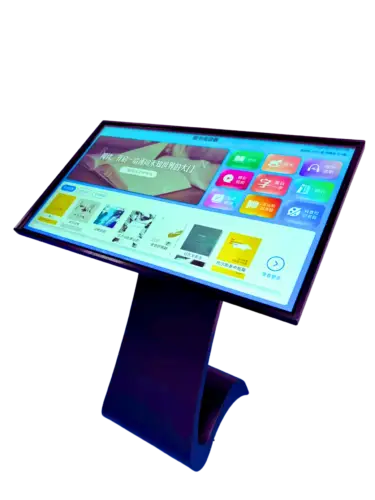
An HMI (Human-Machine Interface) is a purpose-built operator terminal. It runs proprietary runtime software from the automation vendor, communicates with a PLC over a fieldbus, and displays screens you build in that vendor’s configuration tool. It is designed to do one job — visualize and operate a machine — and it does that job with industrial reliability and almost no IT overhead.
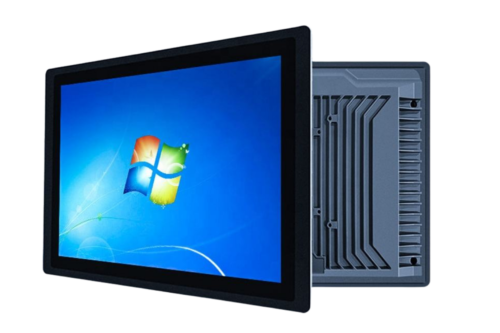
A panel PC is a full industrial computer behind an industrial touchscreen. It runs a general-purpose operating system (Windows, Linux, or Android) and therefore runs anything that runs on that OS: SCADA clients, MES terminals, database front-ends, vision software, browsers, remote-desktop sessions, custom applications.
The architectural difference drives everything else:
| Dimension | HMI | Industrial Panel PC |
|---|---|---|
| Software | Vendor runtime only | Any OS-compatible application |
| Processing power | Modest, fixed for device life | Scalable from Celeron to Core i7 |
| Connectivity to IT | Typically PLC-side only | Full network citizen: dual NIC, VPN, RDP |
| Data handling | Tags, trends, alarms in device memory | Local database, CSV, API calls, MQTT |
| Display size | Small (7″–12″ typical) | 7″ up to 21.5″+ |
| Development | Vendor configuration tool | Standard dev stack (C#, Python, .NET, web) |
| Licensing | Vendor runtime license per device | OS + application licenses |
| Typical lifespan | Whole-machine lifecycle, tightly coupled | 5–7 years, revision-controlled platform |
| Best at | Machine control and operator interface | Information, integration, and multi-tasking |
If you already know which column your project falls into, you can stop reading and specify it. If you are weighing them, the next four sections are where the decision is actually made.
New to the hardware itself? Our what is an industrial panel PC explainer covers architecture and components; the complete buyer’s guide covers specification end to end.
Where HMI Wins
Fixed-function machine control. When the requirement is a defined set of operator interactions — start/stop, recipe selection, alarm acknowledgement, jog controls — an HMI is the right tool. It boots fast, it is validated by the automation vendor, and it has no OS to patch.
Safety- and certification-adjacent functions. Machine builders working to functional-safety standards often prefer HMIs because the runtime and the safety-relevant interaction pattern are validated as a unit. Introducing a general-purpose OS into that path means additional validation effort you may not want to own.
Minimal IT burden. An HMI sits on the machine network and stays there. No domain joins, no antivirus policy, no Windows update windows, no remote-access discussion with the customer’s IT department. On multi-machine OEM builds, this simplicity compounds across every unit shipped.
Lowest per-station hardware cost. For a control-panel-mounted operator terminal with modest display requirements, HMI hardware and software licensing typically come in below a panel PC of comparable size. If the function set is genuinely fixed, that saving is real and permanent — not a compromise.
Where the Panel PC Wins
Third-party and custom software. The moment the requirement includes a SCADA client that is not the PLC vendor’s own, an MES terminal session, a weighted in-house application, a Python data logger, or a browser-based dashboard, the HMI category is out. HMIs run vendor runtimes; they do not run your application.
Data, not just tags. If the station must store shift data locally, export CSV files, write to a local database when the network drops, call a REST API, or publish MQTT messages to a broker, a panel PC does it natively. On an HMI, the same requirement becomes PLC-side scripting gymnastics or an extra gateway device.
IT integration and remote support. Dual network interfaces let a panel PC separate the OT network from the plant IT network, with VPN and remote-desktop access for your service team. That capability changes your support economics: a parameter issue on a line in another province can be diagnosed remotely in ten minutes instead of a site visit.
Display and interaction reach. Large-format SCADA overviews, multi-window layouts, PDF drawings, video feeds from a vision system, and touch interfaces that operators can read from two metres away all push toward the panel PC category. An HMI at 7–10 inches physically cannot host them.
Multi-tasking across functions. One panel PC can be the machine’s operator station, the line’s MES entry point, and the shift dashboard. Three HMIs would otherwise sit on the same machine front.
Customization and supply flexibility. Panel PCs are commonly offered with OEM/ODM customization — bezel, branding, I/O layout, processor tier, and OS image — and can be sampled from a single unit before a volume commitment. HMI platforms are far more constrained: the vendor defines the hardware, and your differentiation stops at the screen.
The Cost Comparison Nobody Prints
The common mistake is comparing hardware price tags. The honest comparison is total cost across the project, including the layers nobody quotes:
| Cost item | HMI | Panel PC |
|---|---|---|
| Hardware | Lower | Higher |
| Runtime / OS licensing | Vendor runtime license | OS + app licenses (often already owned) |
| Engineering | Configuration in vendor tool | Application development or deployment |
| Integration with IT | Rarely needed | Firewall/VPN/domain setup, one-off effort |
| New requirement mid-project | Often a new device or PLC-side workaround | Usually a software change |
| Remote support capability | Limited | Native |
| Spare strategy | Same model, vendor-dependent | Platform revision control, longer availability |
Two observations from real projects. First, when the required function set is fixed and modest, HMI wins on cost — cleanly. Second, the moment a project adds “and it should also show the production report,” the HMI route quietly acquires a second device, and the cost advantage disappears along with the simplicity argument.
There is also a hidden cost on the HMI side that surfaces late: component and spare-part provenance. Because HMIs are often sourced through automation channels with closed supply chains, buyers rarely ask what is inside the unit or how long the exact model will stay available. On the panel PC side, the equivalent question — new versus refurbished components, batch traceability, platform lifecycle — is a legitimate procurement checkpoint. A manufacturer operating one-item-one-code traceability from component intake to final test can answer it in minutes; a low-cost builder usually cannot.
Choosing: A Decision Matrix
The table below resolves panel PC vs HMI for the requirements that come up most often in machine and line specifications.
| If your project requires… | Choose |
|---|---|
| Fixed operator interactions on one machine | HMI |
| Functional-safety-validated operator path | HMI |
| Lowest cost for a pure machine interface | HMI |
| Third-party or custom application software | Panel PC |
| Local data logging, database, or API/MQTT integration | Panel PC |
| MES terminal or SCADA client | Panel PC |
| Remote diagnostics and IT network separation | Panel PC |
| Display larger than ~12″ or multi-window workflow | Panel PC |
| Multiple functions at one station | Panel PC |
| OEM branding and hardware customization | Panel PC |
A practical rule integrators use: if the station only exchanges tags with a PLC, an HMI is enough. If it touches data, software, or the IT network, specify a panel PC.
The Hybrid Most Real Projects End Up Building
Many machines end up with both — and that is not indecision, it is correct architecture. The pattern looks like this:
- HMI mounted at the machine for operator interaction with the PLC: start/stop, jog, alarms, recipe selection. Validated, simple, vendor-supported.
- Panel PC mounted nearby (or on a swing arm) as the line’s information station: MES entry, production dashboard, documentation, remote-support endpoint.
The two coexist on the same machine network, each doing what it is best at. When you specify the panel PC, size it for the information role — larger display, dual NIC, enough processing headroom for the next software revision — and let the HMI stay lean.
If you are deciding between a panel PC and a separate touch monitor driven by a box PC, that is a different trade-off — cable routing, cabinet space, and mounting flexibility change the answer. Panel PC versus touch monitor comparison is covered separately in our hardware series.
FAQ
Can a panel PC replace an HMI completely? Functionally yes — a panel PC can run HMI software and communicate with the PLC. The reasons to keep an HMI are usually commercial and organizational: vendor-validated runtime, functional-safety considerations, lower cost for fixed function sets, and no OS maintenance burden.
Is an HMI more reliable than a panel PC? Not inherently. An HMI has fewer software variables because it runs a single validated runtime. A properly specified panel PC — fanless, industrial-grade components, industrial SSD, sealed front panel — is highly reliable, but it carries OS-level maintenance responsibilities the HMI does not.
Which one is better for a project that will grow? The panel PC, if growth means new software functions, data integration, or larger displays. If growth means more machines of the same design, the HMI route scales cheaply per unit. Decide which kind of growth you are planning.
Do panel PCs require a Windows license for every unit? If the application requires Windows, yes — budget it per device and consider OS edition (IoT Enterprise versus standard) for fleet management and update control. Linux and Android options avoid the license line item entirely for applications that can run on them.
Get a Second Opinion Before You Commit
Machine-front hardware decisions are expensive to reverse. If you are weighing an HMI against a panel PC for an integration project in Southeast Asia — or you need both, sized correctly — send us your requirement: machine function, software stack, PLC platform, network topology, and physical environment. Our engineering team will review the specification and tell you where we would change it, including where the cheaper option is genuinely the better one. Sampling starts from one unit, and every unit is built with 100% new, fully traceable components.