A machine control system fails at 2 a.m. The service engineer traces the fault to the operator interface — a consumer all-in-one PC mounted behind the guard, its fan clogged with dust, its motherboard dead after eleven months of 24/7 duty. The production manager’s question the next morning is not “what happened” but “why did someone put an office computer on a production line?”
That question is the shortest route into this topic. What is an industrial panel PC, in practical terms? It is not a ruggedized version of the desktop AIO you buy at retail.It is a different class of machine, designed from the board up for continuous operation in environments where commercial hardware fails. This article explains what makes an industrial panel PC distinct — the architecture, the components, and the real-world jobs it is built to do — so you can recognize one when you specify it, and explain the difference to the person signing the budget.
Defining the Industrial Panel PC
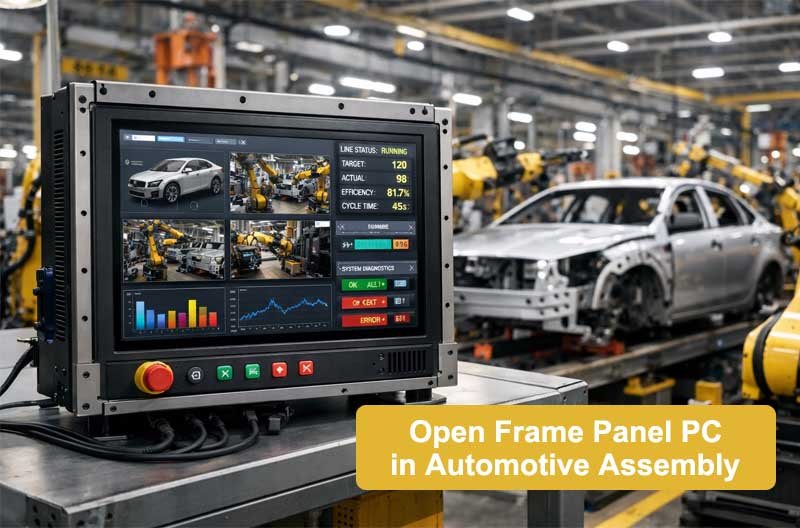
An industrial panel PC is a complete computing system — processor, storage, memory, display, and touch input — integrated into a single sealed chassis, engineered for continuous operation in demanding physical environments. One unit does the job of “computer + monitor + keyboard,” mounted where the operator needs it: on a machine front, in a control cabinet, on a wall, or on an arm.
Three properties separate it from commercial hardware:
- Sealed construction. The front face is rated for dust and water ingress (IP65 is typical, IP66/IP69K for washdown environments). There is no open vent grille and no user-serviceable fan that lets dust, fibers, or conductive debris inside.
- Continuous-duty design. Components are selected and thermal margins are set for 24/7 operation, often in ambient heat where an office PC throttles or trips its thermal protection.
- Long lifecycle and industrial I/O. Platforms stay in production for years with revision control, and the machine carries RS-232/422/485 serial ports and wide-range DC power inputs that consumer boards simply do not offer.
For a structured walk through specification, see our complete industrial panel PC buyer’s guide — eight decision factors with comparison tables.
What’s Inside: Core Components
Understanding the internal architecture helps you evaluate why an industrial panel PC costs more than a consumer AIO — and where that money buys reliability.
Sealed Front Bezel and Display Assembly
The bezel is the machine’s first line of defense. On washdown-rated units it is a single-piece frame with a gasketed seal, often in stainless steel, that keeps liquids out while the touchscreen operates underneath. The display itself is industrial-grade — selected for brightness (300 nits and up), wide viewing angles, and operation across wide temperature ranges rather than office brightness and color accuracy.
Touch Layer
Industrial panel PCs ship with two dominant touch technologies: projected capacitive (PCAP) for glass-smooth, multi-touch interfaces in clean environments, and resistive for gloved operation and wet or dusty conditions where PCAP struggles. The touch controller is matched to the display by the manufacturer, which is one reason buying a complete panel PC beats pairing a commercial monitor with an aftermarket touch overlay.
Industrial Motherboard and Processor Platform
The heart is an industrial-grade motherboard supporting entry Celeron/N-series processors for lightweight HMI duty up through Core i5/i7 for SCADA clients, MES terminals, and vision applications. “Industrial-grade” here means: components with wider operating temperature ratings, BIOS optimized for unattended boot and power-loss recovery, and a supply lifecycle measured in years rather than months.
Fanless Cooling System
Most industrial panel PCs cool passively — the processor transfers heat through heat pipes to a finned aluminum heatsink on the rear of the chassis. No fan means no moving parts to wear out and, critically, no air path to pull dust into the electronics. Fanless operation is the single biggest reliability upgrade over commercial design.
Storage
Units ship with industrial-grade SSDs (SATA or NVMe) rather than consumer drives. Industrial SSDs use higher-endurance NAND and include power-loss protection so a sudden machine shutdown does not corrupt the file system mid-write — a real risk on production floors where power events are common.
Power and I/O
A proper industrial panel PC accepts a wide-range DC input (typically 9–36 V) so it can share the machine’s 24 V control supply instead of needing an AC adapter. I/O includes the serial ports that still dominate industrial communication, dual Ethernet for separating OT and IT traffic, and expansion options (M.2, Mini-PCIe) for fieldbus cards, 4G/5G modules, or additional storage.
How the Architecture Differs from Office Computing
| Layer | Commercial AIO PC | Industrial Panel PC |
|---|---|---|
| Cooling | Fan-forced air intake | Passive heatsink, no air path |
| Enclosure | Plastic, vented | Sealed metal, gasketed front |
| Power | AC adapter, ~12–19 V | Wide-range DC, 9–36 V direct |
| Duty cycle | 8 h × 5 days | 24/7, year-round |
| Operating temp | 10–35°C | −20°C to 60°C typical |
| Serial/fieldbus I/O | None (USB only) | RS-232/422/485, isolated options |
| Platform lifecycle | 6–18 months | 3–5+ years, revision controlled |
| Boot behavior | Manual/power button | Auto power-on recovery, watchdog |
The last row deserves emphasis in any procurement discussion. A consumer motherboard discontinued after fourteen months turns your deployed fleet into an unsupported liability; an industrial platform with revision control gives you a documented migration path. This is also where supplier integrity surfaces: components claimed to be “new” should be verifiable. A manufacturer that cannot show component provenance batch by batch may be mixing refurbished parts into builds — which is why reputable suppliers operate one-item-one-code traceability from component intake through final test.
Where They Are Deployed: Use Cases
The architecture earns its cost only where the environment demands it. Typical deployments for system integrators:
| Use case | Why an industrial panel PC |
|---|---|
| CNC and machine-tool operator panels | Vibration, cutting fluid splash, gloved operators |
| Production line MES terminals | 24/7 data entry at the line, dust exposure |
| SCADA stations in control rooms | Reliability + serial connectivity to field devices |
| Food & beverage lines | Washdown with high-pressure hoses → IP66/IP69K stainless |
| Pharma and cleanrooms | Sanitization agents, strict downtime budgets |
| Warehouse and logistics | Continuous duty on forklift-adjacent zones, dust |
| EV charging infrastructure | Outdoor temperature swings, unattended operation |
In each case the buying logic is identical: the cost of an unplanned line stop dwarfs the difference between a commercial unit and an industrial one. An hour of downtime on a mid-size food line can exceed the price of the panel PC itself.
FAQ
What is the difference between an industrial panel PC and a regular computer? A regular computer is designed for office environments, cooling, and duty cycles. An industrial panel PC is sealed, passively cooled, and rated for 24/7 operation with industrial I/O — engineered for factory floors rather than desks.
Does an industrial panel PC need an operating system? It ships as a hardware platform and supports the OS your application requires — Windows (IoT or standard), Linux, or Android. Many integrators standardize on one platform and one OS image across an entire project fleet.
Can I customize the hardware for my project? Yes. Panel PC manufacturers offer OEM/ODM customization — bezel, logo, I/O layout, processor options, and BIOS configuration. Customized units can typically be sampled from a single piece before volume commitment.
How long does an industrial panel PC last? With correct thermal and ingress specification, a panel PC commonly serves 5–7 years of continuous duty. The main causes of premature failure are thermal under-specification at the mounting point and consumer-grade storage — both avoidable at the specification stage.
Specifying for Your Next Project?
If you are evaluating an industrial panel PC for an integration project, start from the environment and work backwards through the specification — the complete framework is in our buyer’s guide. When you have a requirement sheet, send it to our engineering team through the inquiry form for a specification review and sample options — sampling starts from one unit, and every component in the build is 100% new and fully traceable.